How Single-Community Operators Can Adopt Proptech Without a Big Team
If you run a single residential community, you don’t need a big team to adopt proptech. You need a clear problem to solve, a platform designed for lean operations, and a rollout plan that fits around the work you already do.

Residents now expect the same convenience from their home that they get from their bank or their food delivery app. They want to book a facility, log a maintenance request or read a community notice from their phone. Single-community operators usually have a community manager, a small onsite team, and not a lot of spare hours.
The good news is that the gap is smaller than it looks. This guide walks through how operators of one build-to-rent building, retirement village, student accommodation site or land lease community can bring in resident technology without hiring for it.
Why proptech can feel out of reach for single-community operators
Most hesitation comes from a few assumptions that made sense a decade ago but rarely hold today.
“We’d need someone technical to run it.” Modern resident platforms are built to be managed by community staff, not developers. If your team can update a social media page or send a group email, they can publish a notice or approve a booking.
“It’s built for big portfolios.” Some enterprise systems are. But many platforms now serve operators at every scale, and a single community often gets value faster because there’s one site, one team and one set of residents to onboard.
“Implementation will take months.” Lengthy projects usually come from custom builds and complex integrations. A configurable, ready-made platform with vendor-led setup can go live in a fraction of that time.
“We can’t justify the cost.” The real comparison isn’t software versus nothing. It’s software versus the hours your team already spends answering the same questions, chasing paper forms and managing bookings by phone.
The real constraints are time and attention. A good adoption plan respects both.

Start with the problem, not the platform
The fastest way to stall a technology project is to try to digitise everything at once. Pick the one or two pain points that cost your team the most time each week and start there.
Common starting points for single-community operators include:
- Maintenance requests arriving by phone, email, text and corridor conversation, with no single place to track them.
- Facility and amenity bookings for gyms, function rooms, guest suites or community halls managed in a diary or spreadsheet.
- Community communication where notices go out on paper or by email and residents still say they never saw them.
- Resident onboarding that relies on printed welcome packs and repeated move-in questions.
- Events and engagement that are hard to promote and harder to measure.
A quick way to choose: ask your onsite team what they’re tired of answering. The most repeated question is usually the best first feature.

Choose a platform built for lean teams
When you don’t have an IT department, the platform and the vendor behind it have to do more of the heavy lifting. Look for these qualities:
- One platform, not a patchwork. A resident app and an operations back end (often called a CMS) that work together mean fewer logins, fewer integrations and less to train your team on.
- No coding required. Your community manager should be able to publish content, manage bookings and respond to requests without help from a developer.
- Vendor-led setup and onboarding. The provider should configure the platform with you, load your community’s details and train your staff, rather than handing over a login and wishing you luck.
- Built for your community type. A retirement village, a student residence and a build-to-rent building have different rhythms. Choose a platform that understands residential living rather than retail or commercial property.
- Room to grow. Start with a few features and switch more on as your team gets comfortable. If you later acquire a second community, the platform should scale with you.
- Responsive support. With a small team, a quick answer from your vendor matters more than a long feature list.
Ask every vendor the same question: “What does the first 30 days look like for a team of our size?” The answer will tell you a lot.
A simple rollout plan for a small team
A phased approach keeps the workload manageable and builds confidence as you go.
- Prepare (weeks 1–2). Nominate one internal champion, usually the community manager. Gather the basics: resident list, facilities, house rules, key contacts and your most common resident questions.
- Configure (weeks 2–4). Work with your vendor to set up your community profile, your first one or two features and your branding. Keep it simple. You can add more later.
- Soft launch (weeks 4–5). Invite a small group of engaged residents to try the app first. Their feedback will catch issues early, and they become advocates when you launch to everyone.
- Full launch (weeks 5–6). Open the app to all residents with a clear reason to download it, such as “book the BBQ area here” or “all maintenance requests now go through the app”.
- Expand (month 3 onwards). Once the first features are part of daily routine, switch on the next priority, such as events, surveys or digital onboarding for new residents.
Timelines vary by community and vendor, but the principle holds: launch small, prove value, then grow.

Getting residents on board
Adoption depends on residents, not just staff. Single-community operators have an advantage here: you know your residents personally, and that relationship does a lot of the persuading for you.
- Give one clear reason to download. Residents adopt an app when it becomes the easiest way to do something they already need to do.
- Make the switch visible. Use posters in lifts and common areas, QR codes at reception and a mention at every resident interaction during launch month.
- Help in person. Run a short drop-in session, especially in retirement living and seniors communities, where some residents may want a hand getting set up.
- Keep the old channel open briefly, then close it. Accept requests the old way for a short transition period, then gently redirect people to the app.
- Fill it with useful content early. A welcome message, upcoming events and practical community information give residents a reason to open the app again.
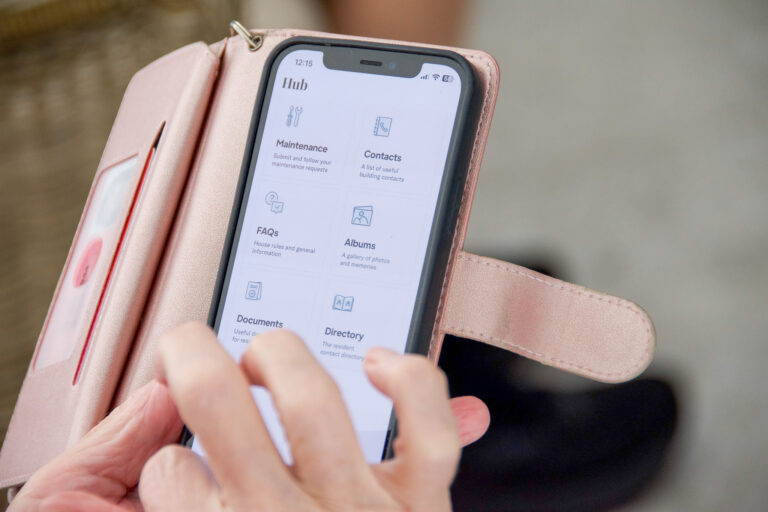
Measuring whether it’s working
You don’t need a data team to know whether your investment is paying off. Track a handful of simple measures from the start:
Measure | What it tells you |
|---|---|
Resident sign-up rate | How many households are using the app |
Requests and bookings made in the app | Whether residents have shifted away from phone and email |
Time to resolve maintenance requests | Whether the process is faster and better tracked |
Staff hours on routine admin | Whether your team has time back for higher-value work |
Resident satisfaction or feedback | Whether the experience has improved for the people who live there |
Take a rough baseline before launch, then check in at 30, 60 and 90 days. Even informal numbers help you decide what to switch on next.
Small team, modern community
Adopting proptech as a single-community operator isn’t about matching the scale of large portfolio operators. It’s about giving your small team better tools and giving your residents the modern experience they expect.
Start with one problem, choose a platform built for operators like you, and let the vendor carry the technical load.
Generator’s resident app and operations platform is designed for residential living communities of every size, from a single site to a multi-community portfolio, across build to rent, retirement living, student accommodation, seniors living and land lease communities. Talk to the Generator team to see how your community could get started.
Join the Revolution: Embrace Our Resident App Today!
Ready to experience a revolution in residential living? Reach out now and embrace the future of living and become part of a vibrant, empowered movement redefining the way we live.